Managing Monorepos Just Got Smoother on Divio


Cristina Saiu
Marketing
Introduction
Monorepos can make life easier for your developers, but harder for your cloud provider, depending on how well their platform supports them. When you’re juggling multiple apps or services inside a single repo, one shared Dockerfile often isn’t enough, especially if you’re working across environments, projects, or teams.
That’s why we’ve just rolled out support for multiple Dockerfiles per environment on the Divio Cloud Platform.
Now you can define and assign a specific Dockerfile for each environment of your application. It’s a small change that makes a big difference when your stack grows more complex.
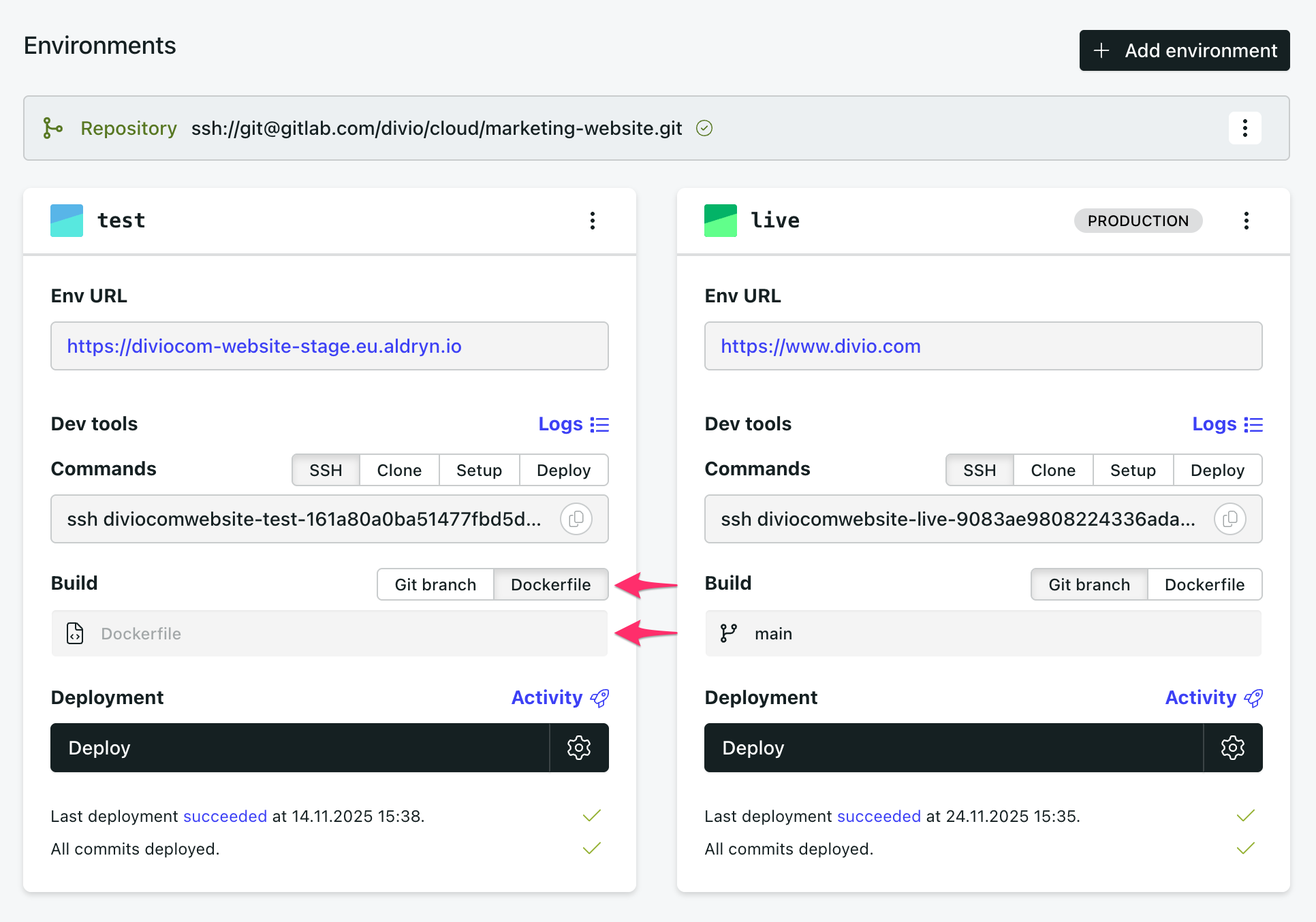 Tailored Builds for Each Environment
Every environment (Test, Live, or custom ones like Staging or QA) can now be built using its own Dockerfile. That means you’re free to create distinct builds for each phase of your deployment cycle without duplicating repos or hacking together workarounds.
For example:
Use
Dockerfile.devfor your development environment,Define
Dockerfile.testfor your testing pipeline,And the main
Dockerfilefor your live deployment
It’s all configurable directly from the Control Panel.
Why This Matters for Monorepo Teams
Monorepos are great for keeping code in one place, but they get tricky when different services need different build steps. Previously, you had to standardize across services or bend your workflow around the platform.
Now, Divio adapts to you. Each environment within an app can point to its own Dockerfile, even though they all share the same Git repo. That’s a win for teams managing:
Multiple services inside a single repo
Separate staging and production flows
Custom build pipelines for client-specific apps
This is especially useful for digital agencies juggling multiple projects under one roof. You can now isolate builds per client, per stage, or per use case, all within the same codebase.
How to Get Started
Go to your application’s Environment settings in the Control Panel. You’ll now see the option to select a custom Dockerfile from your repository.
Make sure:
The file exists in your repo
It includes everything needed to build and run that environment
You give each Dockerfile a clear name that reflects its use (like
Dockerfile.qa,Dockerfile.clientname, etc.)
You can continue using a shared Dockerfile if that’s working for you, but now you’ve got options.
Working with Monorepos?
If your agency uses monorepos, this update can seriously streamline your setup. From cleaner environment builds to safer testing and easier onboarding, we can help you get the most out of it.
Start your free 30-day trial and explore it hands-on
Talk to our team for a personalized walkthrough and use case advice
Already working with us? Just ping us in the Control Panel
Need a Hand?
The feature is live now. If you're already on Divio, it's ready to go in your dashboard. Have questions? We're here. Real people who speak your language.